Outsmarting the web for Privacy? The Science of Browser Fingerprint Spoofing
Have you noticed how websites still tailor Ads to you even when you're not logged in anywhere? If you're to guess how they pull it off, your first thought could be:
Cookies — those annoying pop-ups on websites that record my every move.
And to be fair, you wouldn’t be far from the truth. But it gets a lot more sophisticated than that.
Web platforms, including Google, TikTok, and Facebook, collect a startling amount of data about you via browser fingerprinting.
Browser or device fingerprinting is a technique that collates various data points from your browser and device to uniquely identify you. This unique ID, or fingerprint, can then be used to track you across the internet, irrespective of whether or not you use Incognito tabs.
If this sounds abstract, try the identifier on fingerprint.com. Note your visitor ID and visit history in both the incognito and regular tabs.
In the following sections, I’ll dive into the intricate world of Browser Fingerprint Spoofing and everything you need to protect your personal data online. By the time you are done reading, you will be able to answer the following:
- The fundamentals of Browser fingerprinting tech, how it collects data, and its implications.
- Browser Fingerprint Spoofing, and how it tackles online profiling.
- The role of Antidetect browsers in the context of browser fingerprinting.
- Recommended browsers for Fingerprint Spoofing without complexities and security risks.
Every facet is interconnected, so read to the end — or at least check off the points above before you leave.
What Kind of Browser Fingerprints Are visible for websites?
As stated earlier, Browser fingerprints are created using essential parts of your browser. And as such it is almost inevitable that any user who visits the website gets ID’d, even when they Disallow Cookies.
To make this more relatable, imagine a site running something as simple as this:
console.log("User Agent:", navigator.userAgent);
console.log("Platform:", navigator.platform);
console.log("Language:", navigator.language);
This is an oversimplification for the sake of context. Behind the scenes, fingerprinting tools collect dozens of such data points — from graphics rendering to installed fonts — to piece together a fingerprint that’s uniquely you.
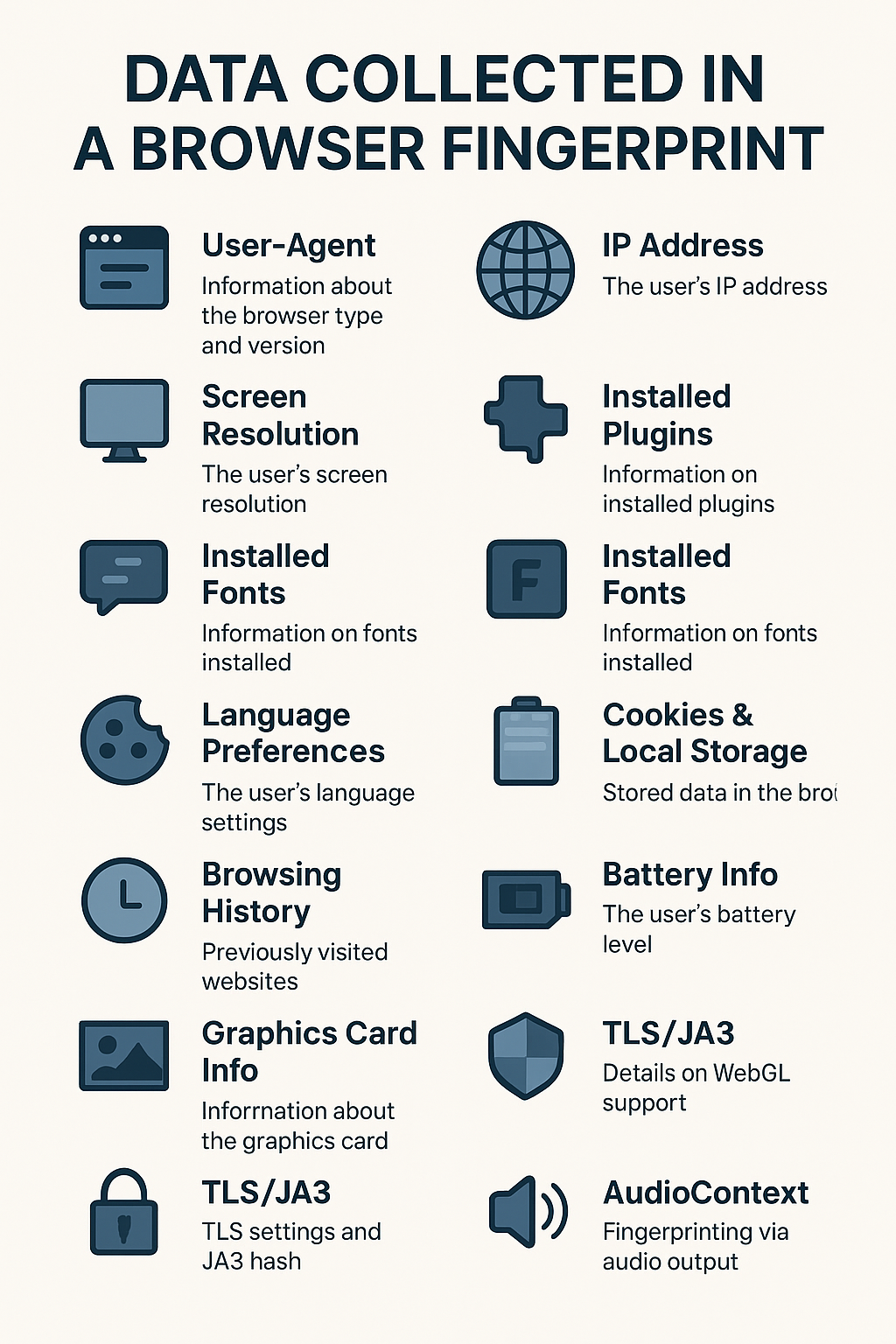
At a higher level, there are different kinds of fingerprinting. See the major ones below:
1. Canvas Fingerprinting
Canvas fingerprinting identifies users by how their browsers render graphics using the HTML5 <canvas> element. The Canvas API offers some of the most reliable high-entropy sources in the browser, making it highly effective for fingerprinting. Different devices—even exact same models—render graphics slightly differently, leading to unique canvas drawings. Here's a simple example of how to generate a canvas fingerprint:
const canvas = document.createElement("canvas");
const ctx = canvas.getContext("2d");

// Draw text — small differences in how this renders = fingerprint signal
ctx.textBaseline = "top";
ctx.font = "14px Arial";
ctx.fillText("Hello, world!", 2, 2);

// Convert pixels to a string fingerprint
const fingerprint = canvas.toDataURL();

console.log("Canvas Fingerprint:", fingerprint);
2. WebGL Fingerprinting
Unlike Canvas fingerprinting that operates in a 2D context, WebGL fingerprinting digs deeper into the 3D rendering system of a browser. WebGL capabilities by extracting details (such as GL_RENDERER, GL_VENDOR, and GL_VERSION) via WebGLRenderingContext.
3. TLS Fingerprinting
Instead of relying on graphical rendering, this approach inspects the TLS handshake, specifically the ClientHello message. Key attributes such as cipher suites, elliptic curves, TLS extensions, and protocol versions help construct a hash, which acts as a unique identifier.
And in contrast to rendering-based fingerprints, which may vary with software updates or hardware changes, TLS fingerprinting remains consistent across sessions and is more resistant to client-side modifications.
4. CSS Properties Fingerprinting
More like Canvas and WebGL fingerprinting, this method exploits rendering differences — but instead of analysing graphical output, websites use getComputedStyle() to probe support for specific CSS properties and computed values.
While CSS properties are received uniformly, devices render them differently due to variations in browser engines, system fonts, and GPU acceleration, etc. This technique is particularly effective for differentiating between browsers rather than devices.
The Implications of This Data Collection
Collecting personal data without consent can raise significant concerns for all parties, especially the users. Some of these concerns include:
- Privacy Concerns. Collecting such data without consent can raise significant privacy concerns, potentially leading to unwanted tracking.
- Security Risks. Information like installed plugins and user-agent strings can be exploited by malicious actors to target vulnerabilities and exploit victims.
- User Profiling & Discrimination. Websites can create detailed profiles of users, affecting their online experience and potentially infringing on anonymity. These user profiles could be used to unfairly discriminate against certain groups of users.
A number of privacy advocacy groups have developed anti-tracking and anti-fingerprinting techniques to fight it. The most popular of them being Browser Fingerprint Spoofing.
Browser Fingerprint Spoofing as solution
As the name suggests, Browser Fingerprint Spoofing manipulates or masks browser attributes to prevent websites from accurately tracking and identifying users.
It disrupts the data points used to generate a unique fingerprint, such as user-agent, canvas rendering, and TLS settings using script injections, software modifications, and masking browser details are examples.
However, these solutions are quite complex and rather technical for the average user. Instead, there are certain tools that can be used to achieve the same result without these complex processes.
1. VPNs
VPNs mask your IP and encrypt traffic but don’t prevent fingerprinting, which relies on device-specific attributes. For better protection, combine a VPN with other anti-fingerprinting tools.
# VPNs
+---------------+      +-------------+     +----------------------------+
| Your Device   | ---> |     VPN     | ---> | Internet Traffic         |
| (OS, hardware |      | (Masks IP,  |      | (Encrypted; device-based |
|  details)     |      | encrypts    |      | fingerprint remains)     |
+---------------+      | traffic)    |      +--------------------------+
                      +---------------+
2. Proxy Configuration Tools
Proxies, like VPNs, hide your IP by rerouting traffic, but they don’t encrypt data. This makes them a faster but less secure option as a standalone. Popular tools like FoxyProxy simplify proxy management, though proxies are most effective when combined with other privacy measures.
# Proxy Configuration Tools
+---------------+      +----------------------+      +--------------------------+
| Your Device   | ---> |   Proxy Server       | ---> | Internet Traffic         |
| (OS, hardware |      | (Reroutes traffic,   |      | (IP hidden; device-based |
|  details)     |      | hides IP)            |      | fingerprint remains)     |
+---------------+      +----------------------+      +--------------------------+
3. Third-Party Apps & Plug-ins
Extensions like user-agent switchers, screen resolution spoofers, and font changers modify fingerprinting data points, but websites analyze multiple factors. Pairing them with privacy-focused browsers improves effectiveness.
4. Anti-Detect Browsers
Anti-detect browsers create separate browsing environments — or browser profiles — each with its own unique fingerprint, browser headers, and other identifying information. The robustness of these browsers make it difficult for websites to link these environments to one another, thereby providing optimum privacy.
# Antidetect browsers
+--------------------+     +---------------------+     +----------------------+
| Your Device        | --> | Fingerprinting      | --> | Anti-Detect Browser        |
| (OS, hardware)     |     | Process             |     | (Spoofs browser details)  |
+--------------------+     +---------------------+     +----------------------+
                                 ^
                                 |
                           +--------------+
                           |     VPN      |
                           |  (Masks IP)  |
                           +--------------+
Solving Fingerprint Tracking with an Antidetect Browser (Incogniton)
The end-goal of Fingerprint Spoofing is to manage multiple isolated browser profiles. Incogniton, an anti-detect browser, achieves this by generating virtual fingerprints that remain consistent yet differ from the user’s actual device.
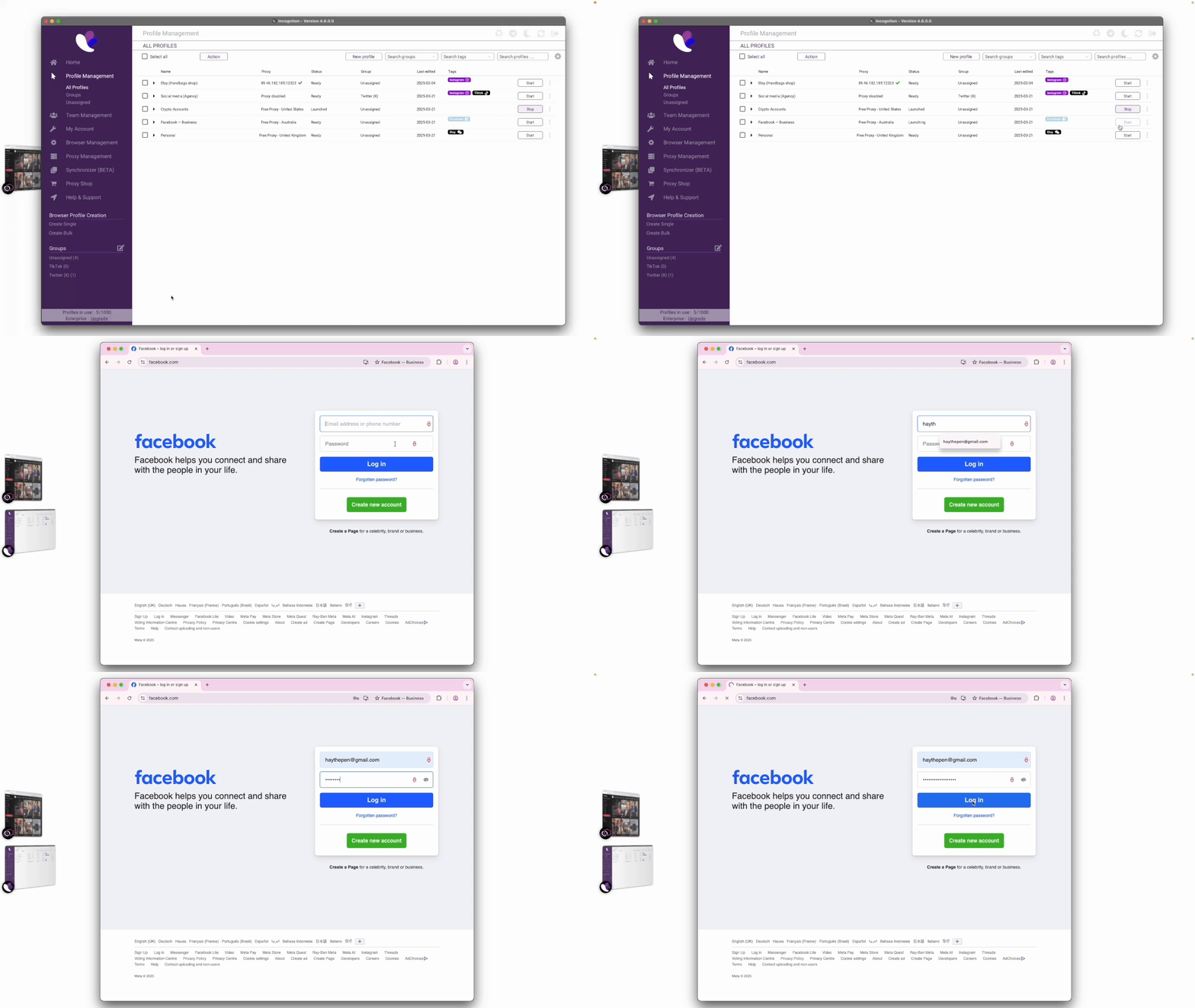
Behind the scenes, Incogniton modifies key fingerprinting parameters like OS characteristics, browser properties, IP address (when used with Proxies), amongst others, to create a unique but masked fingerprint is created for for every browser profile. Each profile operates in a separate environment with unique sessions, local storage, and cookies, allowing seamless switching between profiles.
As a result, Incogniton enables efficient multi-account management while preventing blocks and IP bans.
Expanding its capabilities even further, the Incogniton API supports both Puppeteer and Selenium integrations for software testing, anonymous web scraping, and general automation processes.
Conclusion
So far, we’ve explored the intricacies of Browser Fingerprinting, the kinds of data websites collect, and Fingerprint Spoofing as a remedy. Understanding all this is crucial for anyone aiming to protect their online privacy.
Equally important are the tools we’ve discussed: VPNs, proxy tools, and anti-detect browsers. Together, they help you regain control over your online identity—enhancing your privacy and security.
Your online privacy is your responsibility. Protect your personal data and stay in control of who gets access at all times.

ABOUT THE AUTHOR
Yusuf Abdulhafeez is a software engineer and technical writer, known for his work at Incogniton, Rumi, YoLoop, and beyond. He crafts educative content across various technical domains, including Device intelligence, Fingerprinting, general online privacy, and software development concepts, reaching over a million readers with his insights.
When he's not on his work desk, you may find him outdoor running, working out in the gym, reading a book, or cheering for Arsenal FC.